Some Amiga activites I have worked on in December

I have worked on some small things here or there on my Amiga computers. Here are some noteworthy things that has kept me busy.

Installation of an 2.5″ angled CF adapter in my backup A1200

These angle 2.5″ CF adapters were popular 20 years ago

I found angled 2.5″ CF adapters on AliExpress. I have been looking for these for quite some time. They can not work if you have an Indivision AGA in your A1200 but if you do not have one they offer a great reliable way of running an internal compact flash drive in your Amiga 1200. There was only one problem:

This one has a pin blocked, probably to keep you from frying it by mounting it 180 degrees wrong

They came with one pin blocked. I used a small drill to drill into the blocked pin and realised that it was only the top layer that was blocked. Next step: try it out in my backup A1200.

How nice, a genuine C= Amiga 1200 case and keycaps

My backup A1200 has 3.1 Kickstart roms so I had to upgrade the Kickstarts before trying an Workbench 3.2 installation. So the next step was to flash some roms with AmigaOS 3.2.

FlashROMs are programmed with DiagROM and Kickstart 3.2

Here are the FlashROMs. I decided to flash DiagROM and Kickstart to them as they can hold two ROM images. It is very handy to have DiagROM availble if needed.

A white ReAmiga 1200 matches the case nicely

My backup Amiga 1200 looks like a regular A1200 on the outside but inside it is a white ReAmiga 1200 that I built a couple of years ago.

The more LEDs the better

Here the FlashROMs installed. But it failed to boot into the Kickstart screen, DiagROM worked though. So out came the T48 programmer and FlashROM adapter again. It was impossible to flash the FlashROM again. After 30 minutes of fail checking I realized that I used the wrong USB-A cable for the T48. After swapping cables the correct ROM image was flashed and everything worked.

The ReAmiga 1200 has a kickstart switch built in it

The ReAmiga 1200 has a nice Kickstart switch feature that you can enable. If enabled you can chose between two different ROM images through a jumper. If you do this with a FlashROM you do not need to jumper the FlashROM. As you can see, I never bothered to solder on the fan headers.

The angled 2.5″ CF adapter fits the A1200 motherboard fine

Here is the CF adapter mounted on the internal 2.5″ port of the ReAmiga 1200. Booting off of a WB 3.2 installation it worked fine.

I am using an old school external 23 pin scandoubler, thats why the image is a bit dull

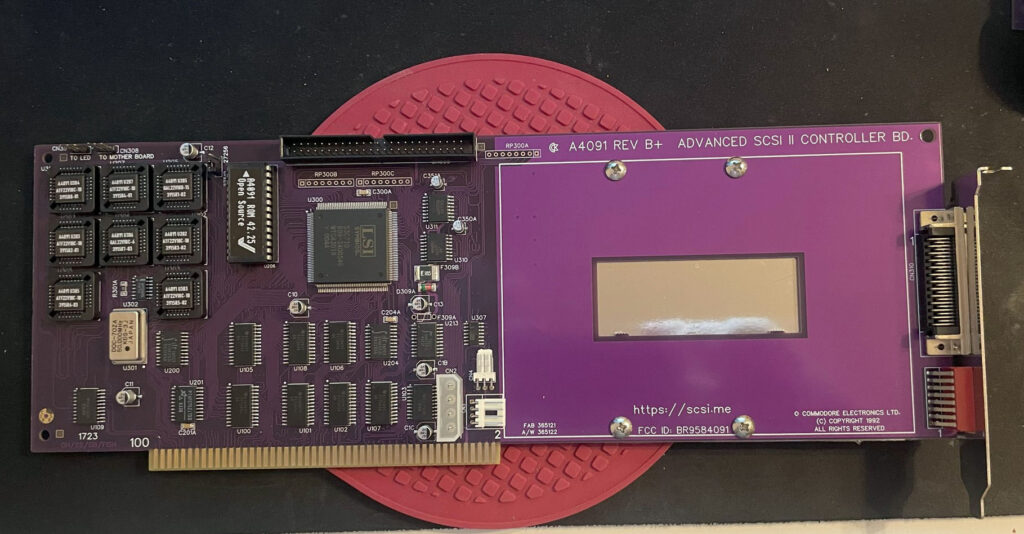
ReA4091 and BFG9060 finally working fine together at 100 MHz

ReA4091 SCSI2 Zorro 3 card

I have had problem with my ReA4091 SCSI card when running my BFG9060 68060 turbo card at 100 MHz. Everything worked fine if the BFG was clocked at 50 MHz but at 100 MHz the system refused to run stable giving me filesystems error instantly in Workbench.

This is not a new problem as many other has had it.

I got a heads up about a thread on github discussing possible solutions to this problem. You can find it here. One suggestion there is to reprogram U305 with the file from here.

Apparently this fixed the problem for the user who suggested it on github with a drawback of 10% less SCSI performance.
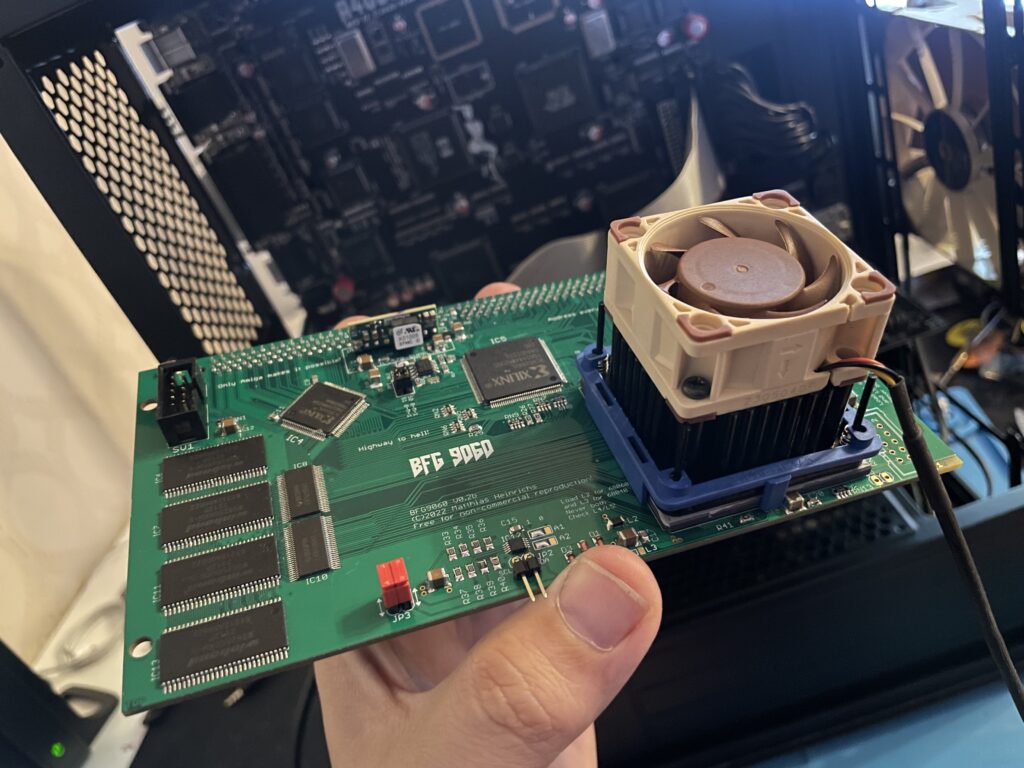
BFG9060 with 68060 rev. 6 clocked at 100 MHz

I did not have anything to lose so I decided to give it a go by flashing the little PLCC chip with the file suggested. To my surprise it actually made my hardware setup stable again at 100 MHz! Now that I have put in a few hours in my system I can confirm that it runs stable.

This particular build consists of an A4000TX, BFG9060 with a rev.6 68060, ReA4091 with a ZuluSCSI compact, there is also a ZZ9000 graphics board in the setup. It is my main setup.

Solas + ISA board installation in my A4000TX

I have a Solas LED controller in my A4000TX, it is hooked up to an ISA carrier and is connected to the clock port on the Zorro-LAN-IDE card. It took a while to figure out how to connect them together and to get sound into the Solas. But after tinkering with it for a few hours it is working fine now.

The sandwich card of the Solas carrier and Solas is too thick though, making it difficult to run a full size Zorro card over it, I am thinking of soldering them together to decrease the height of the card sandwich. It could either be the greatest thing ever or the greatest disaster ever, I will need to flip a coin on how to proceed with this idea.

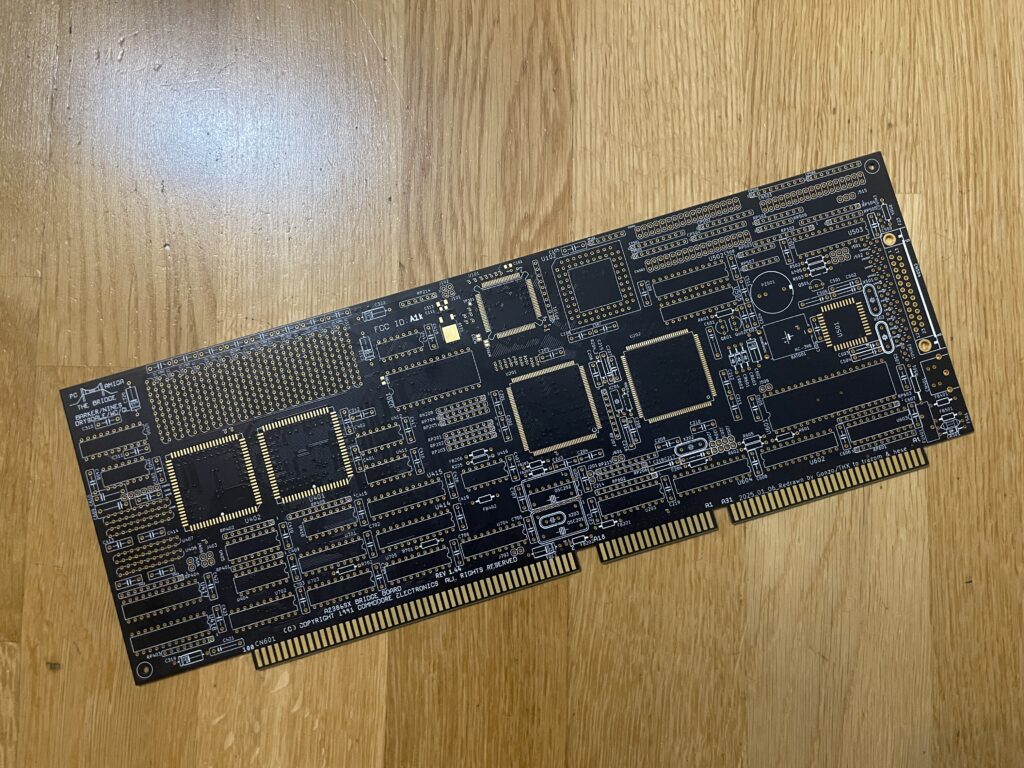
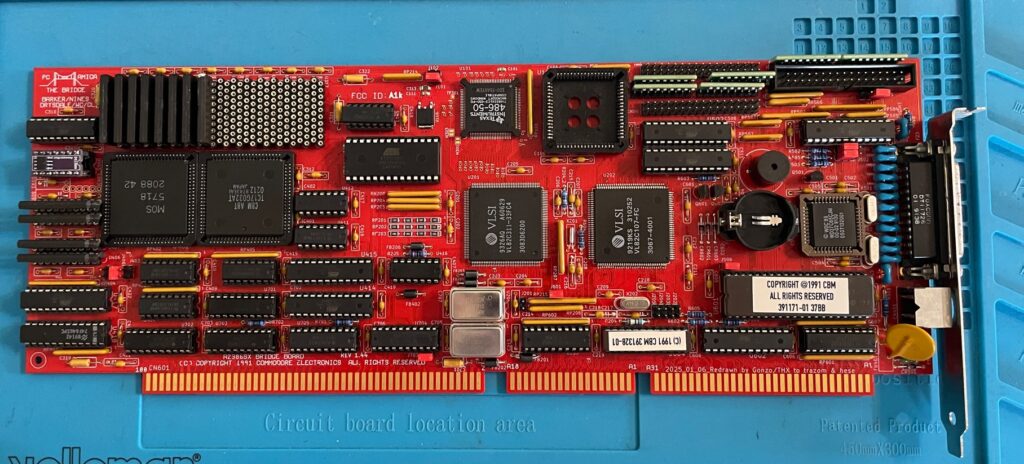
Second A2386SX board built and tested

I like to build things I like in pairs that is why I did not hesitate when I was given the opportunity to build a second A2386SX clone again. You can see some more pics in the previous link. I do not think I will build more of these boards as they have given me a tough time both in getting them working and in sourcing components for them.

A4000T AT case mod

Mid size PC AT case from 1998

I did not hesitate to jump on the train when an A4000T replica PCB was offered for sale on Amibay a few years ago. Building it was a lot of fun and also fascinating. The A4000T is after all the final official 68k Amiga computer released.

I was too naive expecting a case to show up by itself. Now I realize it might never show up so I decided to look for solutions. There are ATX options but I wanted to try an old AT case first.

The universe was aligned with my third eye and suddenly an AT case manifested itself on a local trading place. But the struggle is real, nothing comes without pain and struggle. The A4000T motherboard is huge, it wont fit this case without some cut fingers on old sharp PC case sheet metal edges and serious case modding. And I hate hardcore sheet metal case modding and cutting my fingers on old shitty PC cases.

The A4000T motherboard actually fits inside this case, but it will take some serious case modding to make it happen!

But once modded though, the 5.25 bays the case has wont be usable any more. It wont be able to take an AT or ATX PSU anymore either. But hey, when it is fully modded, at least I got a case for the A4000T where the daughter boards line up perfectly on the back of the case. I just need to figure out how to mod this case in the simplest way possible.
A2386SX – Amiga PC bridgeboard replica

A beautiful replica of the A2386SX PC bridgeboard by Commodore.

This is an amazing replica of the Commodore A2386SX PC bridgeboard, you can find out more about the project here. There is also a discussion forum about the card on the German A1K forum (just use auto translate in your browser if you dont speak German).

Background

The A2386SX was the best PC bridgeboard Commodore made for the Amiga, it was based on a 386 CPU, could be expanded to 8 MB and enabled you to transform an Amiga in a multi CPU system that could run tasks in parallell on both CPUs, one in Amiga Workbench and the other in MS-DOS on the bridgeboard – at the same time. You could for example hop in to MS-DOS and run your programs and then multitask back to Workbench while programs where running in both environments.

This is a beautiful replica of the A2386SX PC bridgeboard by Commodore.

I got my PCB late in Q1 after contemplating if it was even possible for me to build this card at all. Building it was not the problem. The main problem was finding all the parts and programming some of the chips. But I quickly came to realization that it was actually possible to locate almost all the parts if I pulled the trigger at the right moment since some of the rare parts this build required was disappearing fast on Ebay.

My main goal of running the card is to have access to multi channel module players such as Cubic Player and to be able to play PC modules in MS-DOS with a Sound Blaster 16. I would also like to dive into some old MS-DOS applications I used to use 30 years ago and play some old DOS game or two. But the main attraction is PC music without having to get a separate PC just for that.

Some notes on parts and building the A2386SX project

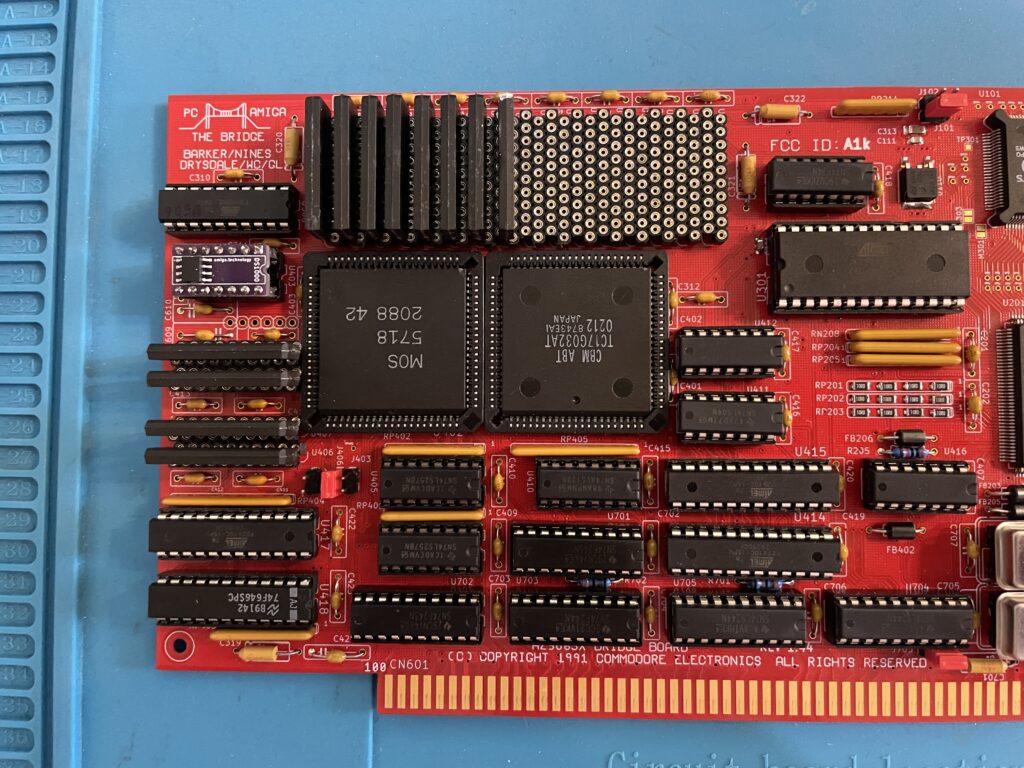
The A2386SX was an old card so it uses ZIP ram instead of SIMM modules as does the replica

There are some very rare parts required for the A2386SX bridgeboard. The rarest chips are the two socketed PLCC84 Commodore chips and the PC chipset in the middle of the card.

The Commodore chips (MOS 5718 and the chip besides it) can be taken from 2088 and 2286 Bridgeboards (they are the same), they might pop up on eBay, but consider that a miracle if they show up. I got my chips from a cheap 2088 that I bought second hand last year. Did not know what to do with that card at the time, but it was too cheap to pass up on and I am glad that I got it now.

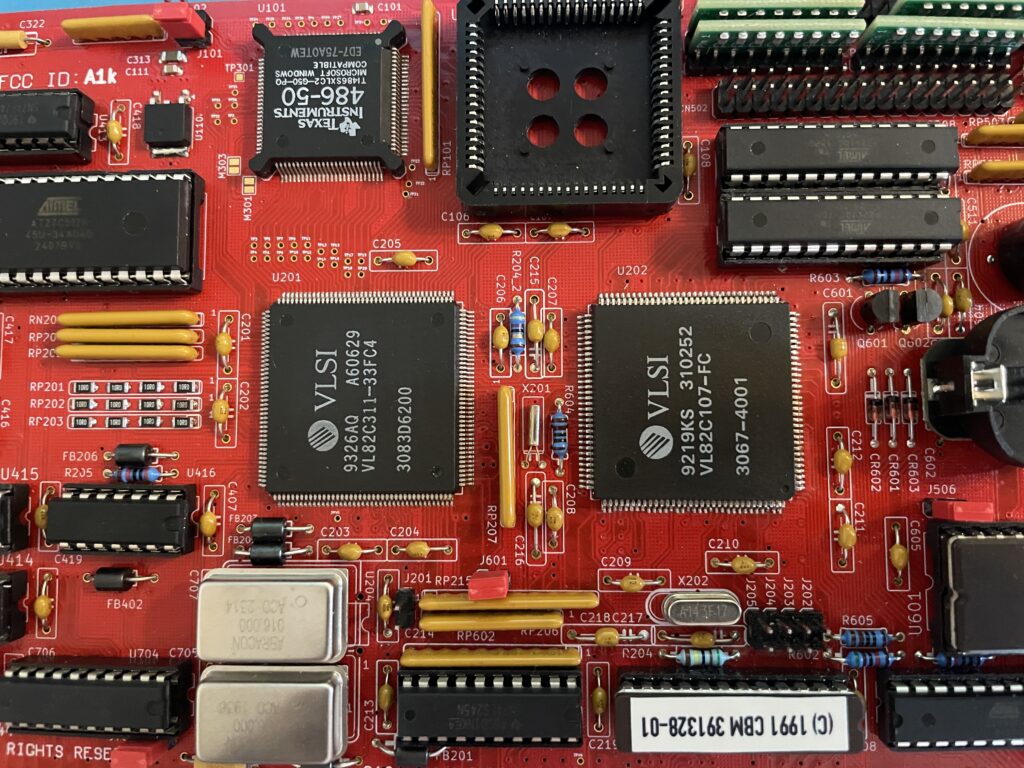
The PC chipset should in theory be easy to find online, but so far, I have only been able to locate one of the chips. The other chip needs to be ordered in bulk from a specialist in rare chips and is costly. I thought it was possible to find an old motherboard and desolder them from there, if you find a motherboard that has them – consider that a miracle!

Then we have other obscure chips such as the floppy controller, programmable chips (that needs a special vintage programmer or someone with better skills than me in understanding how to program them with a modern device) – not really a problem to find them.

ZIP Memory can be found from obscure part specialists (remember you need two types of memory). The CPU is available on eBay, but if you want the faster 486 that is compatible with the card, good luck, as said, miracles can happen!

A difficult to find item is the capacitor networks, you can cheat and use adaptors instead. I wonder if those are needed if you wont use a floppy drive with it though.

Bracket was sourced from another enthusiast who ordered a batch. 646 was taken from my donor A3000.

Full socket build

I did a full socket build, thinking it would make it easy to error check or replace chips. And if by miracle I would build a second card I will be able to test the chips before building it.

486 CPU instead of 386 CPU

So while this is a 386 bridgeboard it uses a 486. I did some research earlier this year when I built my card, unfortunately I have forgotten the exact details, but it is possible to use a special 486 CPU on the board as they are the same physical size. I think what is most important is that the voltage level is the same as the 386 that it is supposed to use and you need to fiidle with the BIOS.

This mod works on the original Commodore A2386SX card also. This is a nobrainer for me since I grew up on 486 PCs.

Failed test run and successful test run!

So after having received more than 10+ packages containing parts for this build from around the world and a the main passives from Mouser I decided to finally build it up. How exciting!

I was really looking forwards doing the first test run after I got the programmed chips back from a friend in the hobby who could program them. But disaster happened – Bummer – The first test run failed – the card refused to run!

Most of my projects I build usually run fine on the first go, if there are any errors it is usually a bad solder joint on a surface mounted component, a dirty board or something that is missing.

In this case I knew I would never figure it out myself, especially after visually inspecting it 10 times, So I sent it off to another friend in the hobby to get it checked.

Turned out that I had used the wrong memory (I had used the memory from my donor Amiga 3000) and there was some small difference between the type of ZIP mem I used and the one that worked with the card. There was also an error in the BOM that has since been updated where bussed resistor nets where specified instead of isolated (or was it vice versa).

Once I received the card with the correct memory and resistors I did another test run and could confirm the card to be fully running!

Next steps

I probably did not realise how much work it would be to set this card up so thats why I will do it after summer. But the plan is to get MS-DOS 6.22 up and running with Windows 3.1. I will run an ISA graphics card and an ISA sound card and will also try to run the HDD off a partition on the Amiga HDD. But as it stands now the A2386SX is fully working and ready to take its place in the big box Amiga that will be its home in the future.

Would also love to build a second card, hopefully there will be an up to date model with chips replaced with CPLDs in the future!

Update 20251222 – Here is A2386SX card replica #2

The second card was built without sockets

The second card is exactly the same as the last one, a different color though. This time it is black instead of red. Another difference is that I built it with less sockets this time.

Here is a closeup of the PC system chips.

Here are the PC system chips. Pay attention to the 486 chip. It was marked as a 486-66, probably an error when relabeling it.

Here are the Commodore chips and the PC memory in the form of ZIP ram (full 8 MB)

And here is the rare 5718 MOS chip and the less but still rare TC17G032AT chip. No PLCC sockets this time!