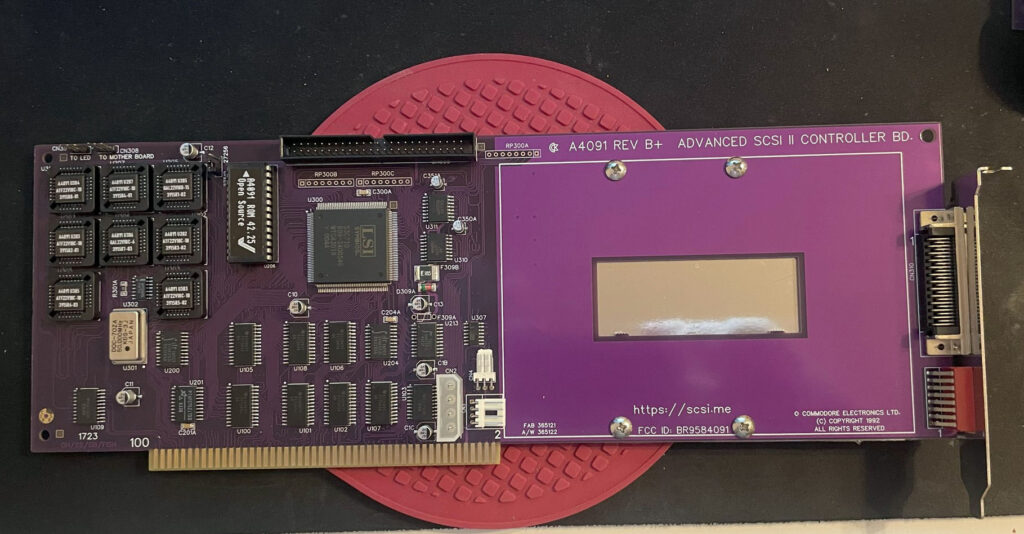
Here is my A4000TX (find out more about the project over at Amibay) as it looks today. The A4000TX is an A4000CR clone in a standardized ATX/EATX form factor. I am running this setup as my primary Amiga. I decided to do two fixes to the system today, quiet the fans and place the ZuluSCSI on the Re4091 SCSI 3 board.
A4000TX cooling with Noctua fans
I am running an old 120mm Noctua fan as the intake and a small 40mm Noctua fan on the turbo card. I wanted to make them more quiet. I solved it by adding an old Zalman Fanmate to the turbo card fan and running the fan on the slowest setting. I added a Noctua fan silencer on the intake fan. The case is nowhere silent but a lot better than running the fans stock.
While you could argue a 120mm intake fan is a bit overkill I think that it wont hurt in the long run as a colder computer lasts longer.
There is a third fan in the PSU but it rarely spins up as the system consumes so little power compared to a modern PC.
A4000TX Zorro cards and cable chaos
Zorro cards in my A4000TX.
Here is a closeup of the cards I am running. The upper card is the ZZ9000AX sound card, then we have the ZZ9000 graphics card, then barely noticeable is the GottaGoFaZt3r memory card, under that a Zorro-LAN-IDE card providing the clock port for the Solas on the Solas ISA carrier in front of it and finally the ReA4091 on the bottom slot.
I managed to fit both the ISA Solas carrier and the ZuluSCSI that is fitted to the 4091, there is not even a mm space left between them. Before I had the ZuluSCSI mounted on the case back, but it looks much better fitted directly to the 4091 card. Since getting the 4091 working with my 100MHz BFG 9060 I decided to keep it in this system.
As you can see there are quite a lot of cables all over the place. No doubt this can be improved.
I have worked on some small things here or there on my Amiga computers. Here are some noteworthy things that has kept me busy.
Installation of an 2.5″ angled CF adapter in my backup A1200
These angle 2.5″ CF adapters were popular 20 years ago
I found angled 2.5″ CF adapters on AliExpress. I have been looking for these for quite some time. They can not work if you have an Indivision AGA in your A1200 but if you do not have one they offer a great reliable way of running an internal compact flash drive in your Amiga 1200. There was only one problem:
This one has a pin blocked, probably to keep you from frying it by mounting it 180 degrees wrong
They came with one pin blocked. I used a small drill to drill into the blocked pin and realised that it was only the top layer that was blocked. Next step: try it out in my backup A1200.
How nice, a genuine C= Amiga 1200 case and keycaps
My backup A1200 has 3.1 Kickstart roms so I had to upgrade the Kickstarts before trying an Workbench 3.2 installation. So the next step was to flash some roms with AmigaOS 3.2.
FlashROMs are programmed with DiagROM and Kickstart 3.2
Here are the FlashROMs. I decided to flash DiagROM and Kickstart to them as they can hold two ROM images. It is very handy to have DiagROM availble if needed.
A white ReAmiga 1200 matches the case nicely
My backup Amiga 1200 looks like a regular A1200 on the outside but inside it is a white ReAmiga 1200 that I built a couple of years ago.
The more LEDs the better
Here the FlashROMs installed. But it failed to boot into the Kickstart screen, DiagROM worked though. So out came the T48 programmer and FlashROM adapter again. It was impossible to flash the FlashROM again. After 30 minutes of fail checking I realized that I used the wrong USB-A cable for the T48. After swapping cables the correct ROM image was flashed and everything worked.
The ReAmiga 1200 has a kickstart switch built in it
The ReAmiga 1200 has a nice Kickstart switch feature that you can enable. If enabled you can chose between two different ROM images through a jumper. If you do this with a FlashROM you do not need to jumper the FlashROM. As you can see, I never bothered to solder on the fan headers.
The angled 2.5″ CF adapter fits the A1200 motherboard fine
Here is the CF adapter mounted on the internal 2.5″ port of the ReAmiga 1200. Booting off of a WB 3.2 installation it worked fine.
I am using an old school external 23 pin scandoubler, thats why the image is a bit dull
Making the ReA4091 work with a BFG9060 clocked at 100 MHz
ReA4091 SCSI2 Zorro 3 card
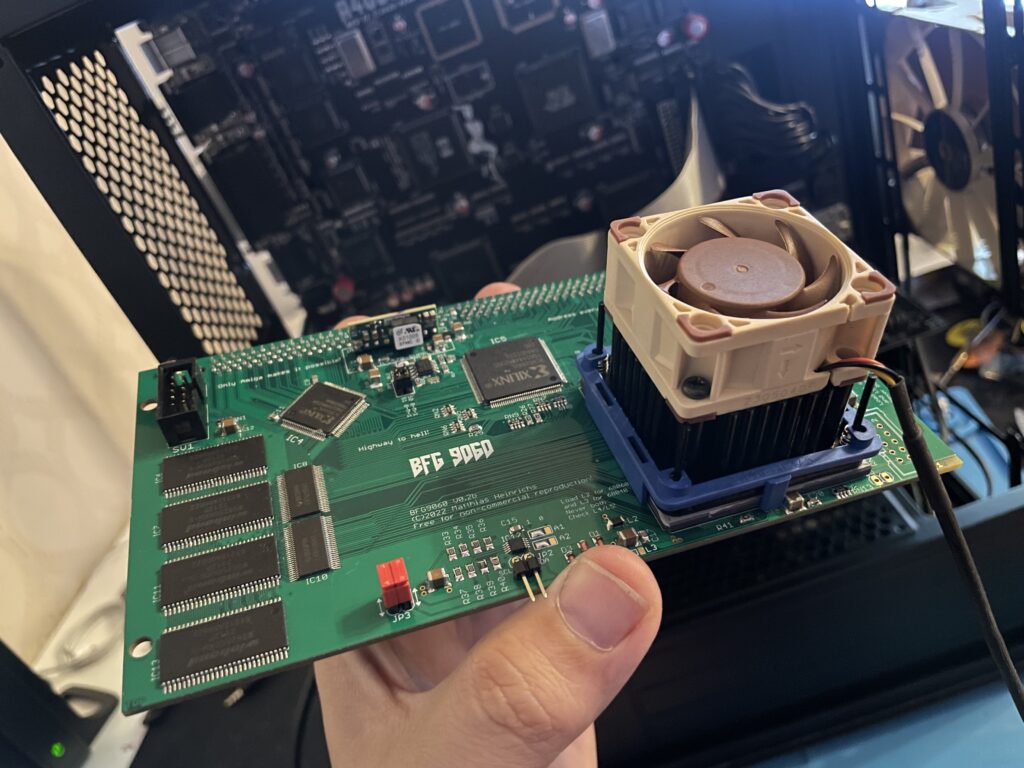
I had problem with my ReA4091 SCSI card when running my BFG9060 68060 turbo card at 100 MHz. The Amiga 4000TX worked fine if the BFG was clocked at 50 MHz but at 100 MHz the system refused to run stable giving me filesystems error instantly in Workbench.
This is not a new problem as many other has had it. But at the same time, many have gotten A4091 and a BFG with a 060 clocked at 100MHz working without trouble.
I got a heads up about a thread on github discussing possible solutions to this problem. You can find it here. One suggestion there is to reprogram U305 with the file from here.
Apparently this fixed the problem for the user who suggested it on github with a drawback of 10% less SCSI performance.
BFG9060 with 68060 rev. 6 clocked at 100 MHz
I did not have anything to lose so I decided to give it a go by flashing the little PLCC chip with the file suggested. To my surprise it actually made my hardware setup stable again at 100 MHz! Now that I have put in a few hours in my system I can confirm that it runs stable (and now more than 6 months later I can confirm that it has been working great).
This particular build consists of an A4000TX, BFG9060 with a rev.6 68060, ReA4091 with a ZuluSCSI compact, there is also a ZZ9000 graphics board in the setup. It is my main setup.
Solas + ISA board installation in my A4000TX
I have a Solas LED controller in my A4000TX, it is hooked up to an ISA carrier and is connected to the clock port on the Zorro-LAN-IDE card. It took a while to figure out how to connect them together and to get sound into the Solas. But after tinkering with it for a few hours it is working fine now.
The sandwich card of the Solas carrier and Solas is too thick though, making it difficult to run a full size Zorro card over it, I am thinking of soldering them together to decrease the height of the card sandwich. It could either be the greatest thing ever or the greatest disaster ever, I will need to flip a coin on how to proceed with this idea.
Second A2386SX board built and tested
I like to build things I like in pairs that is why I did not hesitate when I was given the opportunity to build a second A2386SX clone again. You can see some more pics in the previous link. I do not think I will build more of these boards as they have given me a tough time both in getting them working and in sourcing components for them.
A4000T AT case mod
Mid size PC AT case from 1998
I did not hesitate to jump on the train when an A4000T replica PCB was offered for sale on Amibay a few years ago. Building it was a lot of fun and also fascinating. The A4000T is after all the final official 68k Amiga computer released.
I was too naive expecting a case to show up by itself. Now I realize it might never show up so I decided to look for solutions. There are ATX options but I wanted to try an old AT case first.
The universe was aligned with my third eye and suddenly an AT case manifested itself on a local trading place. But the struggle is real, nothing comes without pain and struggle. The A4000T motherboard is huge, it wont fit this case without some cut fingers on old sharp PC case sheet metal edges and serious case modding. And I hate hardcore sheet metal case modding and cutting my fingers on old shitty PC cases.
The A4000T motherboard actually fits inside this case, but it will take some serious case modding to make it happen!
But once modded though, the 5.25 bays the case has wont be usable any more. It wont be able to take an AT or ATX PSU anymore either. But hey, when it is fully modded, at least I got a case for the A4000T where the daughter boards line up perfectly on the back of the case. I just need to figure out how to mod this case in the simplest way possible.
I built my Alicia 1200 last month. It was time to decide what case to use. Alicia 1200 is an Amiga 1200 clone in a Mini-ITX form factor so it was only natural to try and find a suitable ITX case to mount it in. It is difficult to chose a case when you don’t know future configurations of the machine. I am expecting to add a CPU card in it but do not expect it to grow that much in height. Thats why I went looking for a low Mini-ITX case.
Alicia 1200 motherboard mounted inside a Morex 557 Mini-ITX case
I chose to install the motherboard in a Morex 557 Mini ITX case. It is small case just slightly longer and wider than a 17 x 17 cm Mini-ITX motherboard. In these kind of cases you have to use a Pico PSU with an external adapter. Where I am from a genuine Pico PSU is quite costly but I was happy to find a reseller in EU who had genuine Pico PSUs for a very reasonable sum of money. I got two, one for the Alicia and one for the Denise in case I would need a better Pico PSU for it in the future instead of the cheap knock off.
120w Pico-PSU is powering the Alicia 1200
The Pico PSU sits very tight against the case but it fits with a millimetre to spare!
Morex 557 Mini-ITX case
I don’t think you can find a smaller size case than this and that is why I like Mini-ITX. The case is also well ventilated, perfect for passive cooling.
Two Morex 557 cases, one for my Alicia 1200 and one for my Sam440ep OS4 machine
I already knew about this case since I use it for my Sam440ep. Maybe I will get a third one for my Denise.